If the upload was successful, scroll down.
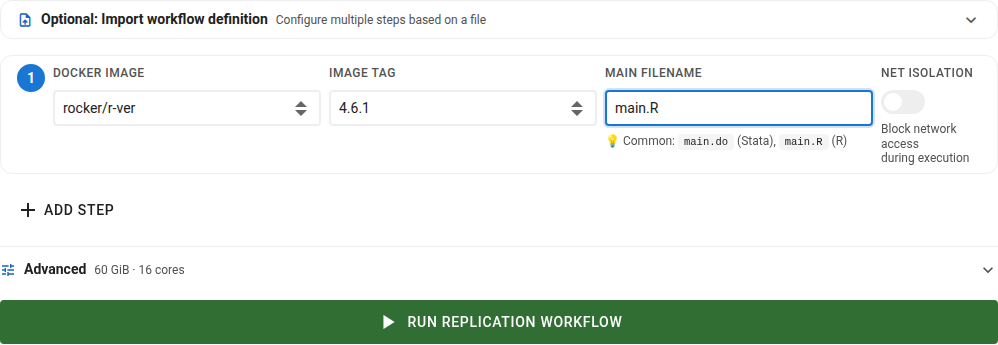
Choose software and version
Choose first the software and version from the curated list (see container images). You can also select an image tag (sub version), but generally, the latest version should work.
Identify the main file
Identify the name of the main file. This is the file that will be executed by SIVACOR. Include the extension (.R, .do, .jl).
The file does not have to sit at the top of your package: SIVACOR searches the whole package for that name, and runs it from the directory it was found in.
About alternate extensions
Some software have multiple ways they can be invoked. For instance, you might use a RMarkdown file (.Rmd) instead of a plain R script (.R), or a Jupyter notebook (.ipynb) instead of a plain script. SIVACOR executes code using methods defined for each software, not by extension: an R image always runs your main file through R, a Stata image always through Stata. Naming a .Rmd or an .ipynb as the main file therefore does not work on its own — you need a wrapper script, in the image’s own language, that your main file points to.
To render an RMarkdown document, the main file would be an ordinary .R script:
# Render RMarkdown
# Assert that rmarkdown is available
if (!requireNamespace("rmarkdown", quietly = TRUE)) {
  stop("rmarkdown package is required but not installed")
}
rmarkdown::render("main.Rmd")
A Jupyter notebook can be driven the same way, from a script in whichever of the supported languages the notebook’s kernel uses.
Note also that many of these “fancier” methods require numerous additional packages just to handle the wrapper. For instance, to render a Jupyter notebook, 31 additional packages must be installed solely to render it. For RMarkdown, 12 additional packages are necessary.
Network isolation
Each step carries a Net Isolation toggle, beside that step’s image and main file. It is off by default, and it is per step, not per submission: one step may be isolated and the next not.
When it is on, the container has no network access at all for the whole of that step. Nothing can be downloaded, no API can be called, and no result can depend on something fetched at run time.
This is the reason to split dependency installation into its own step. Install packages in a first step with isolation off, then run the analysis in a second step with isolation on: the analysis — the part being certified — is then isolated, even though the package downloads were not. See Step 0.
Optional chained runs (steps)
You can chain multiple runs together, by selecting the + ADD STEP button. The runs will be run in separate containers. Each run inherits the workspace modified by the previous run, so the output of one run will be made available as input to the next run.
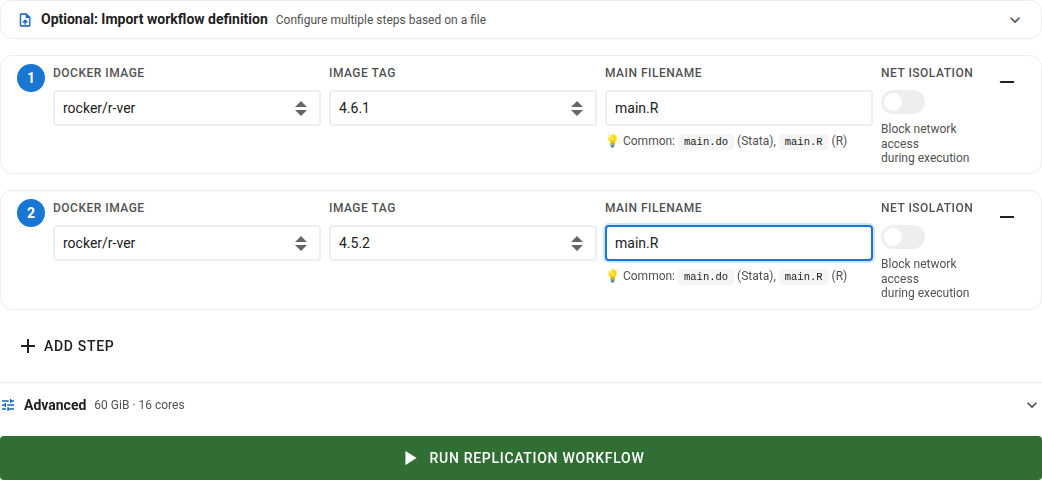
Advanced configuration of steps
If you need to repeatedly run similar jobs on SIVACOR, you can describe the steps in a file
and import it instead of filling in the form. Expand Optional: Import workflow definition
at the top of the submission form, then choose or drag in a YAML or JSON file (any file
name, up to 256 KB). The file is checked before anything is filled in, and you will be told
which step is at fault if something is wrong — for example if an image or tag is not one of
the curated images.
Importing replaces whatever is currently in the form, so you can always review and adjust the steps before running.
A finished run offers the matching Workflow definition download, so the easiest way to get
a valid file is to run once, download it, and reuse it afterwards.
Expected configuration:
stages:
  - image_name: dataeditors/stata15
    image_tag: "2023-01-27"
    main_file: main_step1.do
    network_isolation: true
  - image_name: rocker/tidyverse
    image_tag: "4.6.1"
    main_file: main_step2.R
    network_isolation: false
env_secrets:
  - key: API_TOKEN
value: s3cretimage_name, image_tag and main_file are required for every step;
network_isolation, env_secrets and resources are optional. A file with no resources
block leaves the machine size as chosen on the form:
resources:
  memory_gb: 60
stages:
  - image_name: rocker/tidyverse
    image_tag: "4.6.1"
    main_file: main.R
memory_gb must be one of the sizes in the machine size table. A file naming a size that is no longer
offered is refused rather than quietly run on a different machine, and the message names the sizes
that are available.
resources may also carry disk_gb, for extra scratch disk — but only if your own
account has an allowance for it. A downloaded Workflow definition carries the figure the run was
granted, so a file that came from somebody else may ask for more than you can have; the import is
then refused and names your limit. A run that used no extra disk has no disk_gb line at all.
Advanced settings
Several advanced parameters are in a dropdown menu.
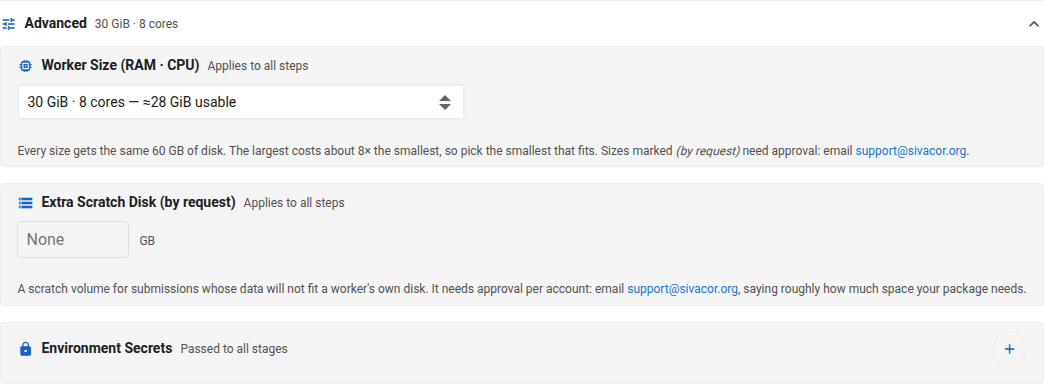
Worker Size: the type of machine your submission runs on
Extra Scratch Disk: a temporary disk in addition to the machine’s own disk space
Environment Secrets: values passed to your code as environment variables.
Choose the machine size
Under Advanced, Worker Size sets the machine your submission runs on. It applies to the whole submission: every step runs on the same machine.
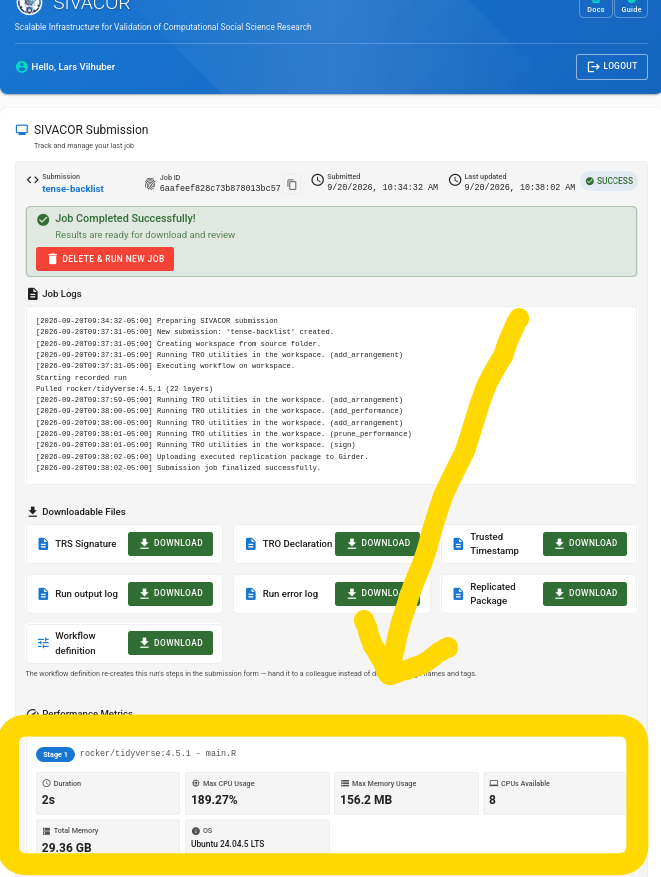
Submissions default to the smallest size. Only request more if you know that you need more. The output from a run shows what your last run actually used, as a share of what it was allowed.
Where to find run statistics
A finished run reports its peak memory and peak disk use on the submission page, beside the download links, as a share of what the machine allowed. Those two figures are what to size the next run on: a run that peaked at 40 % of a 30 GiB machine has no reason to ask for 60 GiB.
Extra scratch disk
Extra Scratch Disk asks for a temporary disk in addition to the machine’s primary 60 GB disk. It is enabled only upon request, see Requesting additional resources.
Once your account has a scratch disk allowance:
enter the number of gigabytes you want for this submission, up to your allowance. Requests are rounded up to the nearest 10 GB;
no changes are needed for your analysis. Your code sees a single filesystem.
the requested number is not preserved from one run to the next - it must be re-entered every time you submit a job.
Requesting additional resources
To request additional resources, send an email to support@sivacor.org.
Information requested
SIVACOR uses a limited allocation of compute resources. The largest machine sizes cost the project four and eight times the smallest, and additional volumes are similarly limited. We review requests sent to support@sivacor.org. Please say what you are running and why it needs the additional resources. Once your account is authorized to use the larger machine sizes, they become selectable. If authorized to use additional volumes, the field becomes editable.
Environment variables
You can set environment variables for your job by using the env_secrets block in a workflow definition file, or by entering them in the submission form. These variables are available to your code during execution.

Workflow YAML Example
env_secrets:
  - key: API_TOKEN
    value: s3cret
Submitting jobs
Then click on the Run Replication Workflow button.

ℹ️ FAQ
See the FAQ.