Preparing a package
What do I set my working directory to for this to work?
We often hear from authors
The person who wants to replicate our files has to set their own path.
and see code like
cd "C:\Users\username\Documents\project"or
setwd("C:/Users/username/Documents/project")You must avoid this for SIVACOR to work. You should use relative paths throughout, and if setting a path, do it once, dynamically.
You can set the working directory to the directory of the main do-file by including this code at the top of your main do-file:
global rootdir : pwdand then either
cd "$rootdir"
use "data/mydata.dta", clear
save "output/results.dta", replace
or (better) use fully-qualified full paths that use $rootdir, e.g.,
use "$rootdir/data/mydata.dta", clear
save "$rootdir/output/results.dta", replace
References
In R, you should use one of several options to set the working directory dynamically. For instance, you can use the here package:
library(here)
setwd(here::here())
which will look for certain files (like .here) to determine the project root. Alternatively, you can use the rprojroot package:
library(rprojroot)
setwd(rprojroot::find_root(rprojroot::is_rstudio_project))
Better: use fully qualified paths downstream from the definition of a rootdir variable:
rootdir <- here::here()
# alternatively:
# rootdir <- rprojroot::find_root(rprojroot::is_rstudio_project())
data <- read.csv(file.path(rootdir, "data", "mydata.csv"))
write.csv(results, file.path(rootdir, "output", "results.csv"))References
What kind of archives can I prepare and upload?
Currently, anything that the Python zipfile or Python tarfile functions can handle. Generically, this means
ZIP files (
.zip)TAR files (
.tar,.tar.gz,.tgz,.tar.bz2,.tar.xz)
If you need a particular format, feel free to reach out to us.
Choosing software and running jobs
How does this run my code?
For R, the system first tries to identify the working directory that R should be run from. The system searches for renv.lock, and uses that directory as the working directory. Failing that, it defines the path to (MAIN_FILE) as the working directory. It then runs
cd (WORKING_DIRECTORY)
/usr/local/bin/R --no-save --no-restore -f (MAIN_FILE)
For Stata, the system always assumes that the directory containing the (MAIN_FILE) is the working directory. It then runs
cd (WORKING_DIRECTORY)
/usr/local/bin/stata-mp -b do (MAIN_FILE)
For MATLAB, the system always assumes that the directory containing the (MAIN_FILE) is the working directory. It then runs
cd (WORKING_DIRECTORY)
/usr/local/bin/matlab -batch "(MAIN_FILE_WITHOUT_.M_EXTENSION)"
Stripping .m is done automatically, you should not omit it from your main file name.
For Julia, the system always assumes that the directory containing the (MAIN_FILE) is the working directory. It then runs
cd (WORKING_DIRECTORY)
/usr/local/julia/bin/julia --startup-file=no --project=@. (MAIN_FILE)
--project=@. makes Julia search upward from the working directory for a Project.toml, and use that environment; if there is none, it uses the default one. --startup-file=no keeps a stray startup.jl out of a certified run.
Note that, unlike R, an renv.lock elsewhere in the package does not move the working directory for a Julia step.
Trying to submit a new job while a job is already in progress
If you try to submit while an earlier submission is still running, SIVACOR refuses the new one and tells you which submission is blocking it:
You already have a submission in progress (‘...’). Please wait for it to finish, or cancel it, before submitting a new one.
The message includes a Go to your submission in progress link that takes you to the submission that is still running. From there you can either wait for it to finish, or use Cancel Job to stop it — once it is cancelled you can submit a new one.
My job runs out of memory
SIVACOR runs every submission on a machine created for that submission alone, and you choose how large it is — see choosing the machine size. Two things commonly cause this:
Your submission used the default size. New submissions default to the smallest machine (30 GiB, about 28 GiB usable). If your analysis needs more, pick a larger size and run it again — that is the whole fix.
The job log names the limit your run was actually given, and the exact amount of memory used. When resubmitting, the submission form also shows what your last run peaked at.
If your analysis needs one of the sizes marked by request, or needs more than the largest, please contact us — do not spend a long time trying to shrink it first. See Step 2 - Requesting additional resources.
My job failed saying it ran out of disk space
The error looks like this:
Ran out of disk space: 4.7 GiB free on the workspace filesystem, below the 5.0 GiB floor.
The machine running your submission has 60 GB of disk, and that space is shared between your replication package (including everything your code writes) and the software image it runs in. Large images consume a substantial part of it — see the disk size table for how much room typical images leave free.
Things that help:
exclude large intermediate or raw data files with
.sivacorignore— note this affects the final package, not what your code writes while runningdelete intermediate files in your own code once you no longer need them
check that your code is not writing very large log or temporary files unintentionally
A larger machine size does not help here: every size has the same 60 GB of disk.
If your package genuinely needs more room than that, ask for extra scratch disk — a temporary disk in addition to the machine’s own, granted per account on request. Email support@sivacor.org and say roughly how much space you need; it helps to quote what your last run’s workspace peaked at, which the submission form shows you.
Monitoring job status
My submission has been “Waiting for a worker” for a long time
SIVACOR starts a machine for each submission, which normally takes two to three minutes, followed by the download of the software image. If other users’ submissions are occupying the machines available to the pilot, yours waits until one frees up.
A wait of several minutes is normal, especially for MATLAB. If a submission stays in this state for much longer than that, please contact us and include the Job ID shown on the page — there is a copy button next to it.
How do I know a job failed?
When a job fails to run, you will see a notice in the job status page:
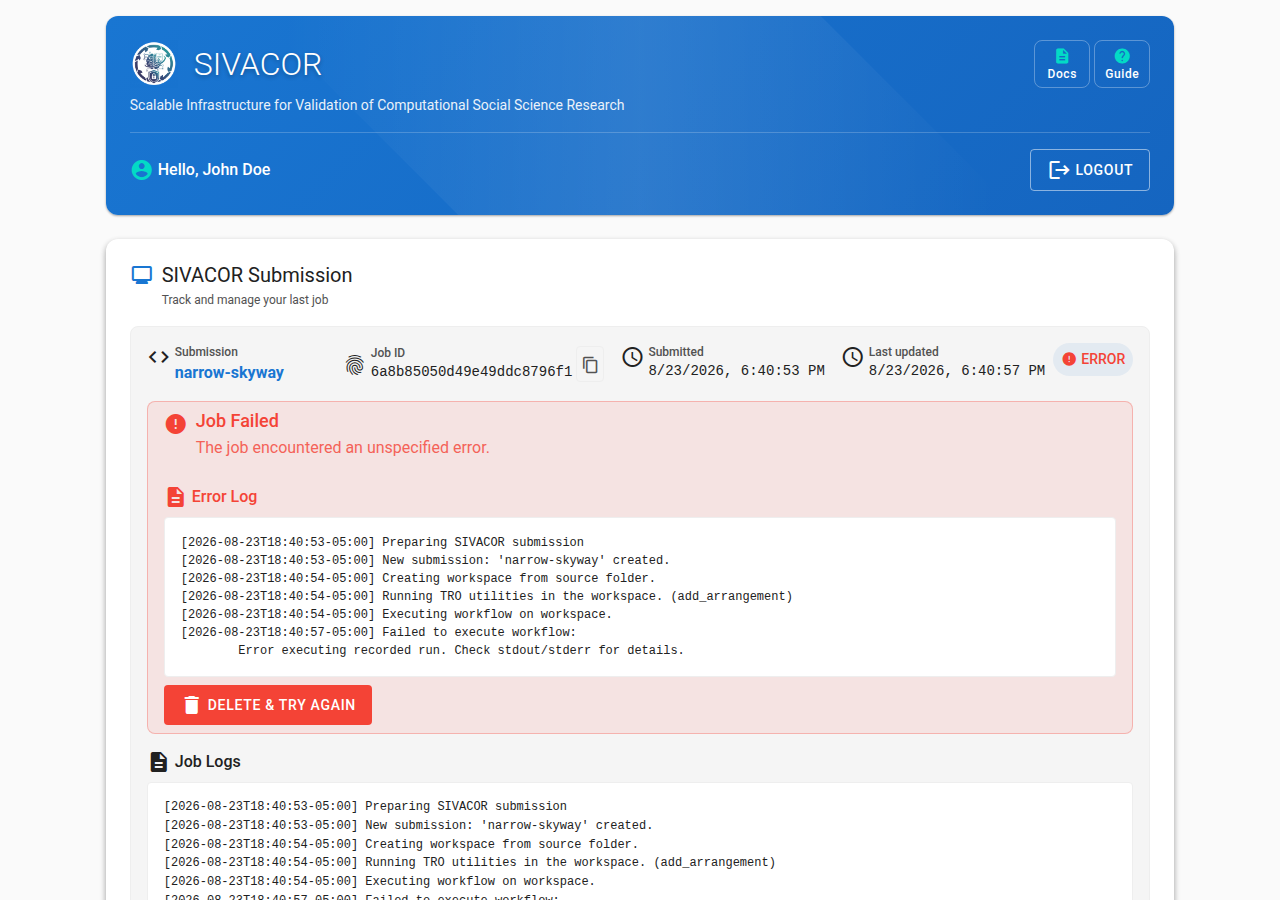
You should inspect the Run output log and Run error log files to see what went wrong. When a job fails, no Replicated Package is produced.
You might want to consult the debugging hints for tips.
My job failed with “Submission abandoned”
The message looks like one of these:
Submission abandoned: no sign of life for 0:31:07; the worker running it is presumed lost.
Submission abandoned: exceeded the maximum runtime of 7 days, 0:00:00; started at ...
The first means the machine running your submission was lost. That is an infrastructure problem rather than a problem with your code — just submit the package again, and contact us if it keeps happening.
The second means your run hit the 7 day limit. If your analysis genuinely needs longer, contact us before resubmitting.
Job is presumed lost
Occasionally the machine running a submission is lost. When that happens, SIVACOR marks the submission as failed with a message like:
Submission abandoned: no sign of life for 0:31:07; the worker running it is presumed lost.
You will receive a failure email. This is an infrastructure problem, not a problem with your code: simply submit the package again. If it keeps happening, please contact us.
The system appears to be down.
SIVACOR runs on Jetstream2. If Jetstream2 is down for maintenance, SIVACOR will be down as well. You can check the Jetstream2 status page for any ongoing maintenance or issues.
If Jetstream2 is operational, but SIVACOR appears down, please contact us via the button at the top of this page.
It’s failing on a file, but the file is there!
Actually, the file may not be called exactly the same thing. The containers used by SIVACOR are based on Linux, and Linux uses a case-sensitive file system. So if your main file is called Main.do, or Main.DO, that is not the same as main.do. The same applies for any files written or read by Stata or R: Reading from data/raw/gs4.csv is not the same as reading from data/Raw/GS4.csv.
Stata errors
r(601)
This is a file-not found error. There are two reasons for this:
you did not include the file in your uploaded package
you included a file that is similarly named, but has different capitalization. Ensure that your code uses naming that matches exactly the files you included, including upper/lower case.
R errors
rJava
Due to the way the containers are set up, it is currently not possible to use Java-related packages. The typical error message will be
Error: package or namespace load failed for ‘rJava’:
 .onLoad failed in loadNamespace() for 'rJava', details:
  call: dyn.load(file, DLLpath = DLLpath, ...)
  error: unable to load shared object '/tmp/workspace-6964fac0d696fbdb1d66ce2c/R/library/rJava/libs/rJava.so':
  libjvm.so: cannot open shared object file: No such file or directory
Issue: SIVACOR
Julia errors
Package Foo not found
This usually means your run has no step that installs these packages — see the debugging notes and Step 0.
If the step that failed is your setup step, consult stderr: that is where Julia’s package manager writes (stdout will be empty). Each step’s output is under its own
===== Stage N Output ===== heading.
Downloading results
What are all these output files?
SIVACOR produces six output files, plus a workflow definition:
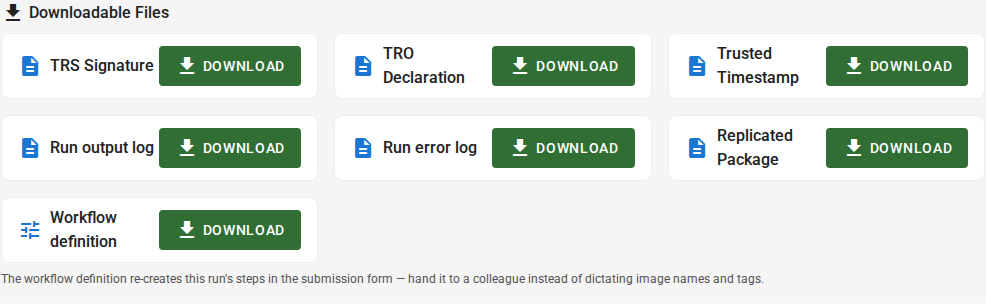
A replicated package as a ZIP file. This contains all the original files, and the output files generated by SIVACOR.
A run output log and a run error log. Ideally the latter is an empty file, but it contains all the error messages the software may have produced. For packages like Stata, these are more likely included in the run output log.
A few TRACE-related files are produced that can be used by others to verify that the files (figures, tables) were truly produced by this system.
A TRO Declaration file. It describes the various states of the process, and describes the files present at each step. On SIVACOR, this is relatively straightforward, but it can grow more complicated.
A TRS Signature file. This is a text file that contains a cryptographic signature of the results, which can be used to verify that the results have not been altered.
A trusted timestamp file. This file contains a timestamp that is certified by a trusted time server, used in the signing process.
These three files are also included in the tro folder inside the replication package.
A workflow definition, a small YAML file recording the software, versions and main files this run used. It is not part of the signed package, and is not evidence of anything — it is a convenience, so the same configuration can be re-created later by importing it on the submission page. It never contains any secrets you supplied.
What can I do with the TRO files? How can I check the package?
There are two levels of verification possible:
whether the TRO Declaration has been modified.
whether some or all of the arrangements correspond to the files you downloaded.
Both of these checks can be done with the Python tro-utils package.
Installing tro-utils
tro-utilsYou can install tro-utils via pip:
pip install tro-utilsor
pipx install tro-utilsVerifying the integrity of the TRO Declaration
You can verify that the TRO Declaration has not been modified since it was signed by running:
tro-utils verify-timestamp /path/to/tro/(UUID).jsonld which might yield something like this:
> tro-utils verify-timestamp tro/tro-696d3b46adffb76fef0d83bc.jsonld
Using configuration from /etc/ssl/openssl.cnf
Warning: certificate from '/tmp/tmpuw0g59lb' with subject '/O=Free TSA/OU=TSA/description=This certificate digitally signs documents and time stamp requests made using the freetsa.org online services/CN=www.freetsa.org/emailAddress=busilezas@gmail.com/L=Wuerzburg/C=DE/ST=Bayern' is not a CA cert
Verification: OK
It is OK to ignore the warning, the important part is the Verification: OK line.
Verifying the arrangements
You can verify that the arrangements in the TRO Declaration correspond to the files you downloaded by running:
tro-utils verify-package path/to/tro/(UUID).jsonld path/to/filesFor instance, in the standard SIVACOR download, the following will generically work
> tro-utils verify-package tro/tro-\*.jsonld project/yielding
Verifying that arrangement 'arrangement/0' matches package contents of 'project/' ✗
Verifying that arrangement 'arrangement/1' matches package contents of 'project/' ✓
This indicates that there are two arrangements (0 and 1) recorded in the package, but only arrangement 1 matches the files in the project/ folder, presumably because some files were either modified, added, or deleted from arrangement 0. In the context of SIVACOR, arrangement 0 are the files you uploaded.
What do I do with the replicated package that I can download?
You can upload it directly to the journal submission system! For instance, in the case of the American Economic Association, simply import the ZIP file into the AEA’s Data and Code Repository (see instructions).
How do I delete files on SIVACOR?
SIVACOR only temporarily retains any files that you upload. You can delete files immediately (after success or failure) by clicking the Delete & Run New Job button on the job status page:

You are asked to confirm first. Download anything you want to keep before confirming, it is not possible to recover deleted files.